
In this article
Copilot Overview & 2026 Industry Position
Copilot is positioning itself as a leader in modern client portal platforms tailored for service businesses. As of 2026, Copilot continues to provide an all-in-one operating system for freelancers, consultants, and firms by combining messaging, file-sharing, payments, and CRM into a white-labeled portal experience. With remote work as the norm and client expectations for self-service and transparency at an all-time high, Copilot addresses a vital niche—streamlining client communication and billing in one intuitive space.
From Launch to 2026: Copilot’s Journey
Founded in 2020 as Portal, Copilot began as a simple tool to unify freelance communication and payments. By 2021, it offered branded client portals and native messaging. It rebranded to Copilot in late 2022, aligning with a vision to become the backend cockpit powering any client-centric operations. In 2023, it introduced modular apps for CRM and eSignatures. By mid-2024, Copilot launched native integrations with Stripe, QuickBooks, and Zapier. In early 2025, it rolled out Copilot AI Assistants to further streamline client queries. Its 2025 thesis: Service businesses shouldn’t juggle 10 tools—Copilot gives them a single, elegant portal to run it all.
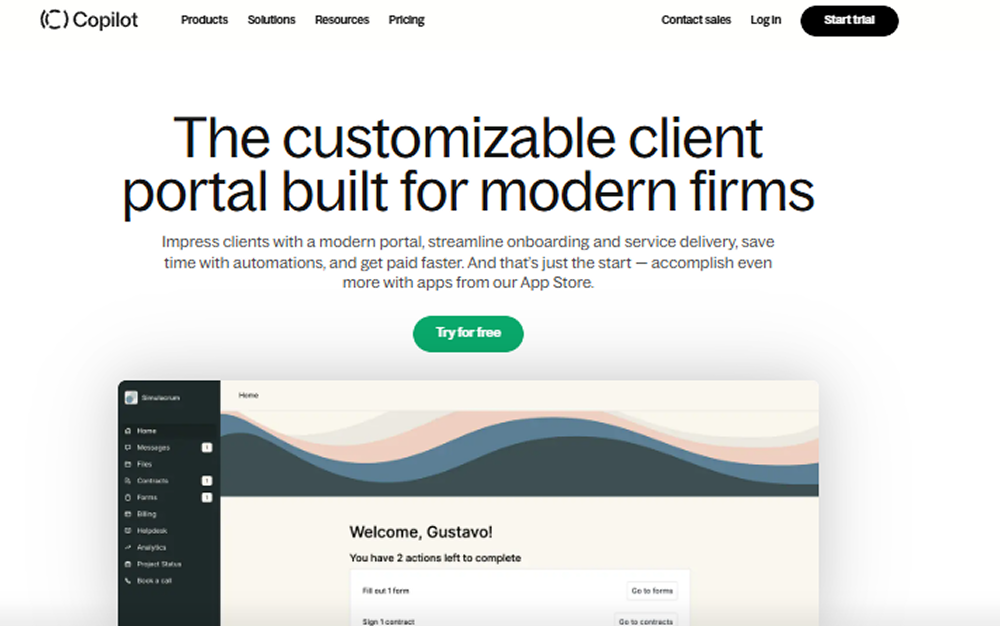
Copilot Key Features
Copilot stands out for its highly modular, customizable architecture and seamless all-in-one experience. Each client portal is fully branded and contains:
- Client Portal: White-labeled with your domain, logo, and brand fonts/colors.
- Messaging: Secure, real-time communications with clients, including email fallback.
- File Sharing: Drag-and-drop file exchanges with permission controls.
- Payments: Clients pay via invoices, subscriptions, or usage-based models. Stripe-native.
- Forms & eSignatures: Built-in form builder with template library and legal-grade signature support.
- CRM: Lightweight client tracking and roles/settings in each portal.
- AI Assistant (2025): Trained on your docs and FAQs to answer client questions 24/7.
Workflow & UX
One of Copilot’s greatest strengths is its minimalist, intuitive interface. Clients see a frictionless portal on web or mobile browser, not a software platform. On the admin side, onboarding is quick—new accounts can launch portals within an hour. Navigation is clearly modular (e.g., Payments, Messaging, Forms), and permissions can be fine-tuned per portal or app. The real-time responsiveness and clean grid layout make even non-technical users confident within minutes.
Pro Tip: Use the AI Assistant to deflect 60–80% of routine client questions without sacrificing client experience.
Copilot Pricing Analysis & Value Metrics
| Plan | Monthly (billed annually) | Key Features |
|---|---|---|
| Basic | $29 / user | Core apps (portal, messaging, file sharing, payments) |
| Professional | $69 / user | Everything in Basic + forms, custom branding, integrations |
| Advanced | $119 / user | All features + AI Assistant, granular permissions, SSO |
Value outlook: For high-touch service businesses with 1–25 team members, Copilot replaces multiple SaaS tools—and its per-user pricing aligns well with its bundled capabilities.

Competitive Landscape
Copilot competes primarily with platforms like:
- Dubsado: Strong in proposals/contracts; less modern UX.
- HoneyBook: Ideal for creatives but lacks modular control.
- ClientPortal.io: Lightweight and simple, but limited features.
- SuiteDash: Comprehensive but harder to set up and customize.
Copilot wins on UI, modularity, AI Assist, and Stripe-native financial flows out of the box.
Use Case Scenarios
Copilot is best suited for:
- Marketing agencies needing branded billing and feedback loops.
- Accounting and law firms sharing sensitive documents securely.
- Startup consultancies managing retainer agreements and performance dashboards.
- Freelancers offering monthly deliverables with built-in chat and payment automation.
Copilot Integrations
Core integrations as of 2026 include:
- Stripe: Seamlessly process one-time and recurring payments.
- QuickBooks Online: Sync invoices and revenue ledger.
- Zapier: Connect to 3,000+ SaaS platforms instantly.
- Calendly: Embed scheduling inside your portal.
- Notion, Slack, ClickUp, Google Drive: Embedded widgets via iFrame or Zapier flows.
Pros & Cons
- Pros: Beautiful UX, white-label portals, built-in payments/messaging, modular app architecture, AI Assistant
- Cons: No native mobile apps (web only), pricing may add up for larger teams, advanced permissions require upper-tier plan
Final Thoughts
Copilot delivers one of the most polished and integrated client portal solutions in 2026. It’s a perfect match for service brands that value branding, speed, and self-service support. While larger teams may find the per-user model pricier, the operational simplicity and unification offset that. For freelancers to 30-person firms, Copilot users report reduced admin time, better client reviews, and faster cash cycles.
Copilot FAQ
Is Copilot HIPAA or GDPR compliant?
Yes, Copilot meets GDPR standards and can support HIPAA compliance via a signed BAA on eligible plans.
Can I use my own custom domain?
Yes, Copilot allows white-label portals using your own domain, favicon, and brand visuals.
Who is Copilot best suited for?
Service-focused firms—consultants, lawyers, designers, marketers—who value client experience and work with clients remotely.
Does Copilot replace QuickBooks or Stripe?
Copilot integrates with both—Stripe powers payments; QuickBooks captures accounting. It complements, not replaces, them.
What kind of support does Copilot offer?
All plans include chat/email support and help docs. Advanced plans unlock onboarding and 1:1 setup assistance.


