In this article
Restream Overview & 2026 Industry Position
Restream continues to be a top-tier platform for multistreaming—broadcasting content simultaneously across platforms like YouTube, Twitch, Facebook, and LinkedIn. Founded with a mission to democratize live streaming, it now supports over 8 million streamers and businesses worldwide. In 2026, Restream is solidifying its position as both a streaming utility and an end-to-end audience engagement platform, enhanced by intelligent automation, native branding tools, and channel-specific analytics. Whether you're a solo creator or part of a full-stack marketing team, Restream’s unified dashboard helps you expand your reach with less effort.
From Launch to 2026: Restream’s Journey
Restream was founded in 2014 in Ukraine with the vision of solving the “audience fragmentation” problem for streamers. Originally a free tool for simultaneous broadcasting, it quickly evolved into a SaaS product with real-time analytics, chat consolidation, and custom overlays. Key milestones include:
- 2016: Launches core multistreaming platform
- 2018: Adds chat and analytics features
- 2020: Launches Restream Studio for browser-based broadcasting
- 2023: Introduces AI-driven scene switching
- 2024: Full redesign of UI and integration with podcasting workflows
2025 Thesis: In 2026, Restream aims to be the “control tower” for live brand engagement, focusing on deep creator monetization and native commerce tools.
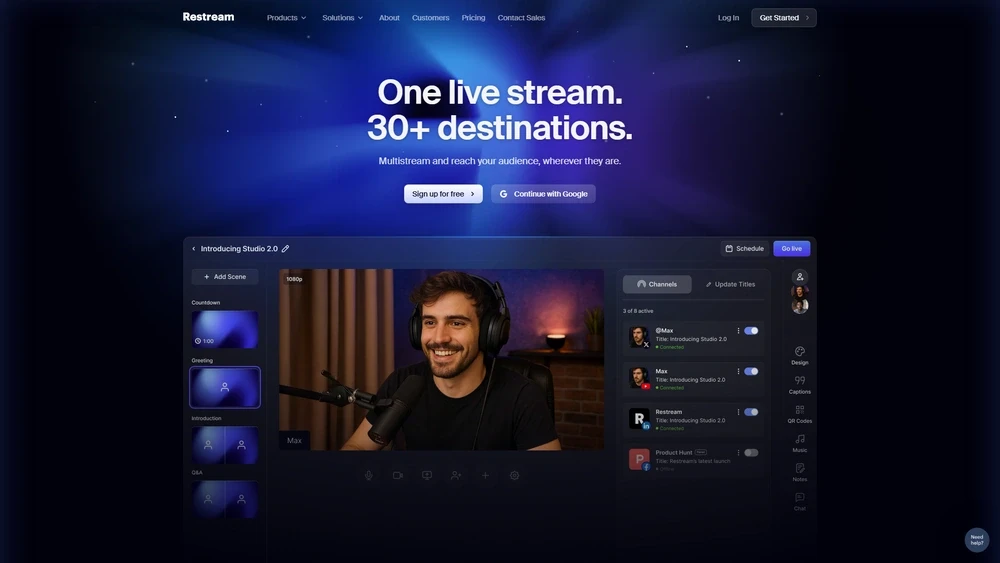
Restream Key Features
Restream’s suite of tools continues to support creators and businesses with reliable streaming backed by powerful integrations and AI enhancements. Notable features include:
- Multistreaming: Broadcast live to 30+ platforms simultaneously
- Restream Studio: Browser-based studio with branding, screen sharing, and guests
- Live Chat Aggregation: Unified chat with moderation across platforms
- Analytics Dashboard: Cross-platform performance insights
- Branding Tools: Overlays, logos, and callouts for live and recorded content
- Playlist Streaming: Stream pre-recorded videos as live
- AI Automation: 2025 upgrades include scene detection, highlight suggestions, and noise reduction
Workflow & UX
Restream streamlines the entire multistreaming workflow within a centralized dashboard. After connecting chosen platforms, users broadcast directly from their webcam/browser, OBS, or encoder. The UX shines in:
- One-Click Platform Pairing: Supports Facebook, YouTube, LinkedIn, Twitch, Kick, TikTok, and custom RTMP setups
- Preview Mode: Simulate scenes or test changes before going live
- Drag-and-Drop Presets: Edit overlays, switch layouts, and cue banners with minimal learning curve
- Mobile Companion: Monitor chats and scheduling via mobile
Overall, Restream’s UX is intuitive enough for solo creators and scalable for production teams managing branded liveshows.
Restream Pricing Analysis & Value Metrics
| Plan | Monthly Price | Key Features |
|---|---|---|
| Free | $0 | Up to 2 destinations, Restream branding, basic studio |
| Standard | $19/mo | 5 destinations, no Restream branding, 6 on-screen participants, recordings |
| Professional | $49/mo | 8 destinations, full HD, custom branding, 10 on-screen guests |
| Premium | $99/mo | 15+ channels, advanced analytics, priority support, RTMP pull/push |
Value Verdict: Restream’s pricing scales affordably from hobbyist to full-time creators. The Professional tier offers maximum versatility for growing teams without heavy studio investment.