In this article
Vibe Overview & 2026 Industry Position
Vibe has carved a niche in the digital collaboration landscape, offering modern teams an intuitive, AI-enhanced collaboration platform that merges whiteboarding, task management, and real-time communication. In 2026, as distributed workforces and hybrid models become industry standards, Vibe continues to evolve to meet the demands of more dynamic workflows across sectors such as design, software development, education, and marketing.
With an emphasis on flexibility, minimal onboarding, and seamless sync across devices, Vibe’s cloud-first tools are particularly relevant to globally connected teams. The brand holds a unique position between traditional conferencing solutions and interactive visual tools—bridging both worlds with one platform.
From Launch to 2026: Vibe’s Journey
Vibe launched in 2018 as a digital whiteboard company, focusing initially on collaborative education. By 2020, its intuitive hardware and software began gaining traction among remote teams during the onset of global shifts to hybrid work. Notable milestones include:
- 2018: Vibe’s first interactive whiteboard debuts.
- 2019: Launches VibeOS, its proprietary whiteboarding software.
- 2021: Achieves commercial use across 40+ countries.
- 2023: Introduces AI-powered smart templates and conversation-to-board tools.
- 2024: Rolls out seamless Miro and Google Workspace integrations.
- 2025: Refines its scalable cloud workspace with role-based permissions and deeper analytics.
2026 Strategy: Vibe is evolving into a cloud-native, AI-assisted workspace engine for dynamic next-gen enterprises seeking unified collaboration across distances and disciplines.
Vibe Key Features
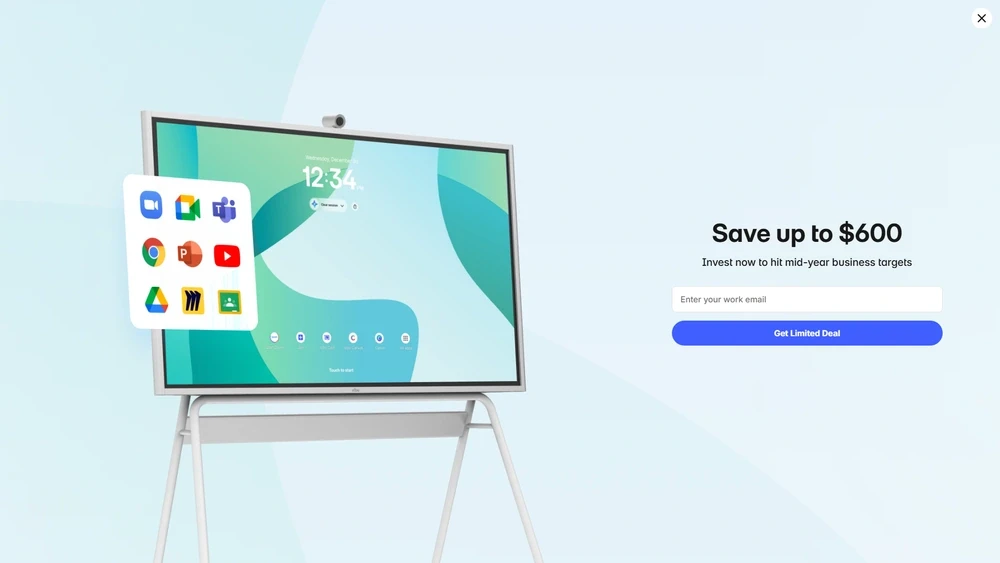
In 2026, Vibe’s offering is anchored by three pillars: interactive whiteboarding, dynamic collaboration apps, and cloud-native integrations using smart AI helpers. Here’s what sets Vibe apart:
- Infinite Canvas Whiteboard: Pinch-to-zoom, infinite scroll, sticky notes, live drawing, and interactive templates.
- Smart Notes & AI Templates: Instant transcription of ideas, summarization, and project kickoff templates using natural language input.
- Multi-Device Sync: Available on touch hardware, desktop, tablet, and browser-based sessions with real-time sync.
- Role-Based Collaboration: Editors, viewers, and guests—control the flow of info without friction.
- Meeting Mode: Collaborative presentation tools for running meetings directly off whiteboards.
With constant product improvements, Vibe offers tools that deliver depth to visual thinkers, product teams, distributed classrooms, and creative marketers alike.
Workflow & UX
Simplicity is Vibe’s strength. Whether accessed on a touchscreen display or via Chrome on a laptop, users are greeted by a clean, customizable hub. Drawing tools are accessible but never overbearing. Color-coded zones help segment discussions for remote workshops, and every action—dragging assets, toggling views—is optimized for low-latency feedback.
The learning curve is surprisingly gentle. Even non-tech-savvy users can launch sessions, invite team members, and annotate projections within minutes. Power-user tools like layered templates and AI-assisted branching are tucked away until needed, preserving visual clarity for regular users.
Vibe Pricing Analysis & Value Metrics
| Plan | Monthly Price | Includes |
|---|---|---|
| Free | $0 | 3 boards, 3 collaborators, limited export |
| Pro | $15/user/mo | Unlimited boards, AI templates, PDF export, 5 guests |
| Team | $29/user/mo | All Pro features + team libraries, SSO, integrations |
| Enterprise | Custom Quote | SLAs, SOC2, onboarding support, API access |
Value Summary: The Pro plan provides substantial utility for freelancers and small teams; however, Team is the true sweet spot for high-velocity orgs needing coordination features.
Competitive Landscape
| Tool | Key Features | Ideal For | Avg. Price/User |
|---|---|---|---|
| Vibe | Whiteboarding, AI tools, real-time sync | Hybrid teams, creative agencies | $15–$29 |
| Miro | Advanced mind-mapping, voting sessions | Design/product teams | $10–$20 |
| Lucidspark | Flowcharts, Visio import, org charts | Enterprise workflows | $7–$20 |
| Jamboard | Google Docs sync | Google-focused schools | Free (discontinued in 2024) |
Unlike most visual tools, Vibe Pro emphasizes simplicity with enterprise-ready structure, giving it an edge in hybrid orgs that need fast onboarding plus scalability.
Popular Use Cases
- Remote design thinkers co-ideating sprints
- Agile product standups with shared timelines
- Workshop facilitation for marketing teams
- Hybrid classrooms in digital learning environments
- Client presentations with live feedback markup
Integrations & Ecosystem
Vibe integrations are extensive in 2026, allowing plug-and-play with tools already embedded across enterprise stacks.
- Google Workspace & Microsoft 365: Calendar syncing, link embedding, and SSO options.
- Miro, Figma, FigJam: Embed and edit directly within boards.
- Slack & MS Teams: Auto-notifications for board changes and mentions.
- Zoom: Whiteboard over screen share + persistent session zones.
Pros & Cons
- Pros: Smooth UX, strong value at Pro plan, flexible device sync, AI features enhance speed, scalable for enterprise
- Cons: Learning curve for new templates, AI occasionally miscategorizes notes, enterprise features gated behind custom pricing
Pro Tip: Use Meeting Mode to co-present on calls inside a board—it pinpoints attention while keeping all visuals live and editable.
Final Thoughts
If your workflows are visual, iterative, and depend on distributed teams, then Vibe Workspace is a compelling choice in 2026. While there may be leaner alternatives for static diagramming or cross-mapping tools, Vibe shines where continuous creative flow and live feedback loops matter. Its combination of simplicity and power makes it ideal for cross-functional teams juggling design, discussion, and deliverable cycles on one shared canvas.
Vibe FAQ
Does Vibe work offline?
Some offline viewing is available for pre-cached boards, but editing and live sync require an internet connection.
Can you embed videos or live links in Vibe boards?
Yes, Vibe supports embedded YouTube and Vimeo videos, along with links to live content and documents.
What platforms is Vibe compatible with?
Vibe works across iOS, Android, Mac, Windows, and any web browser. Hardware users benefit from specialized touch interfaces.
Is there a white-label or custom branding option?
Available on Enterprise plans upon request. Branding tools include logo placement, board rename masking, and portal URLs.
How secure are Vibe sessions?
Vibe uses AES-256 encryption, SOC2-compliant data centers, and optional auto-board archival for enterprise environments.