In this article
Dropbox Overview & 2026 Industry Position
Dropbox, a pioneer in cloud file storage, has evolved into a comprehensive collaboration suite vital for digital-first professionals in 2026. Known for its seamless file synchronization and user-friendly experience, Dropbox now delivers intelligent search, AI-powered summaries, and team coordination tools that cater to a hybrid, work-from-anywhere world. Positioned as a balanced blend of performance and simplicity, Dropbox serves over 700 million users globally with a continued focus on secure content management and smart automation.
From Launch to 2026: Dropbox’s Journey
Dropbox began in 2007 as a simple file-syncing service created by Drew Houston and Arash Ferdowsi. It quickly rose to fame by solving the hassle of USB transfers through its intuitive drag-and-drop interface and folder syncing model. By 2011, Dropbox had over 50 million users. In the years that followed, it expanded with business-grade features, including Dropbox for Business in 2013 and the introduction of collaborative Paper documents in 2015. In 2018, Dropbox went public on the NASDAQ. In 2021, the company embraced Smart Workspaces, integrating AI and automation. As of 2026, Dropbox’s strategy revolves around augmenting cloud storage with intelligent workflows that shorten time-to-task and reduce manual document handling.
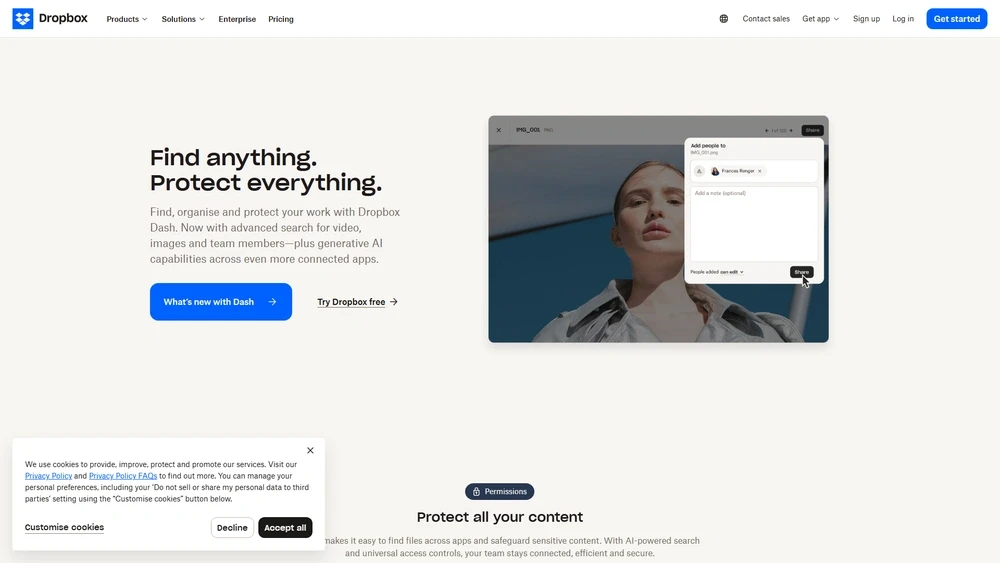
Dropbox Key Features
Dropbox’s 2025 platform goes beyond storage, delivering intelligent automation, secure sharing, and advanced collaboration for individuals and teams.
- Smart Sync & Backup: Streamline storage with automatic cloud backups and selective sync for efficient disk usage.
- AI Summaries & Search: Dropbox AI provides instant summaries, sentiment highlights and semantic document search, powered by proprietary language models.
- DocSend: Enterprise-level control of shared files with viewer analytics and dynamic updates.
- Dropbox Paper: Collaborative document editing with task assignment and content templates.
- eSignature Support (HelloSign): Integrated digital signing support for contracts, NDAs and financial documents.
- Vault & Password Manager: Secure offloading of sensitive content with granular recovery options.
Workflow & UX
Dropbox maintains its reputation for minimalist interface design and straightforward navigation. Uploading and managing files is intuitive, with drag-and-drop support, smart suggestions, and contextual menus that reduce clicks. In 2026, the homepage integrates recent activity, smart recommendations and team task status, making it a dynamic command center. Mobile apps mirror the desktop experience with helpful AI prompts and offline reference support.
Dropbox Pricing Analysis & Value Metrics
As of July 2026, Dropbox offers four plans for individuals and teams. Each tier builds value through storage, access controls, and premium integrations.
| Plan | Price | Key Features |
|---|---|---|
| Basic | Free | 2 GB storage, file syncing, mobile access |
| Plus | $11.99/mo billed annually | 2 TB storage, Smart Sync, Dropbox Rewind |
| Professional | $19.99/mo billed annually | 3 TB storage, file recovery, DocSend access, AI search |
| Business (Standard) | $15/user/mo billed annually | 5 TB shared storage, team folders, centralized admin |
| Business (Advanced) | $24/user/mo billed annually | As much space as needed, HIPAA compliance, SSO, audit logs |
Value Assessment: Dropbox’s pricing balances individual growth with enterprise-grade capabilities, providing top-tier features even in mid-level plans.

Competitive Landscape
| Platform | Key Differentiator | Best For |
|---|---|---|
| Dropbox | AI + Storage Simplicity | Creative teams, remote professionals |
| Google Drive | Docs-first ecosystem | Education, internal collaboration |
| Box | Compliance & EMM | Enterprise, legal, finance |
| OneDrive | MSFT Office Linkage | Microsoft 365 users |
| Notion | Workspace + Wiki | Startups, growing internal teams |
Use Cases
Dropbox serves a wide array of applications:
- Creative Professionals: Centralize large media files and track version history for design, video, and photography.
- Remote Teams: Coordinate tasks, share assets, and run async meetings with Dropbox Paper and shared folders.
- Consultants & Freelancers: Track client files, send secure contracts via DocSend, and automate feedback loops via integrations.
- Startups: Share pitch decks, control investor access, and store strategic documents securely.
Integrations & Ecosystem
Dropbox works seamlessly with major productivity apps:
- Slack – real-time file sharing into workspace channels
- Zoom – automatic drop of recorded meetings into Dropbox
- Trello & Asana – link task cards with Dropbox file references
- Adobe Suite – edit PDFs and design files directly from Dropbox
- Zapier – trigger Dropbox automations from 2,000+ apps
Pros & Cons
- Pros:
- Smooth UX with fast syncing
- Advanced AI tools for file summarization
- Secure client sharing and digital signing
- Deep ecosystem integrations
- Cons:
- Higher pricing for advanced plans
- Limited native editing vs. Google Workspace
- Team management UI can feel basic at scale
Pro Tip: Use Dropbox’s Paper templates to speed up onboarding, project planning, and client reporting with reusable workflows.
Final Thoughts
Dropbox continues to balance usability, power, and ecosystem integration, making it a prime choice in 2026 for content collaborators, document-heavy freelancers, and media-forward teams. While high-powered enterprise users may opt for Box or Microsoft for compliance scalability, Dropbox’s mix of AI-driven workflows and intuitive UX keeps it in the productivity spotlight. Users should weigh the value of smart automation, secure sharing, and app synergy against higher-tier pricing needs.
Dropbox FAQ
What is Dropbox used for in 2026?
Dropbox is used for file storage, AI-based content collaboration, secure sharing, and integrations with tools like Slack, Zoom, and Adobe.
Does Dropbox offer an AI file summary tool?
Yes, Dropbox AI automatically summarizes files, surfaces key facts, and enables semantic document search across your storage.
Is Dropbox secure for client files?
Yes, Dropbox uses 256-bit AES encryption, 2FA, and advanced permission controls, making it viable for sensitive data.
Can Dropbox integrate with CRM tools?
Yes, Dropbox integrates with leading CRM tools like Salesforce to streamline document access within client workflows.
What is the file size limit in Dropbox?
The upload limit is 2 TB per file via the desktop app or mobile. For web uploads, it’s limited to 50 GB per file.