
In this article
Motion (AI assistant) Overview & 2026 Industry Position
Motion (AI assistant) has emerged as one of the most intuitive and strategically impactful AI-powered productivity tools on the market. Designed to automate task planning, scheduling, and team coordination, this nimble assistant blends algorithmic intelligence with real-time adaptability—making it a strong player among modern project management suites. In 2026, Motion positions itself at the intersection of AI scheduling, automated prioritization, and remote team collaboration. With the proliferation of hybrid work and asynchronous communication, this tool has quickly gained traction with tech-forward professionals, teams, and SMBs looking to reclaim control over their time.
From Launch to 2026: Motion (AI assistant)’s Journey
Originally launched in 2021 as a smart scheduling assistant, Motion gained early notoriety for its ability to schedule meetings and prioritize calendar entries automatically.
- Q3 2021: Release of V1, focused on individual productivity and calendar optimization.
- Q1 2022: Team collaboration tools introduced—shared tasks, boards, and meeting buffers.
- Q4 2023: Advanced AI scheduling engine added with GPT-powered suggestions and backlog tracking.
- Q2 2024: Launch of an API and deeper integrations with Slack, Asana, and Notion.
- Early 2025: Rolled out AI-driven intent-based planning for entire teams based on project complexity and deadlines.
Its 2025 product thesis is simple but profound: combat productivity chaos through predictive, AI-generated schedules that adapt in real-time.
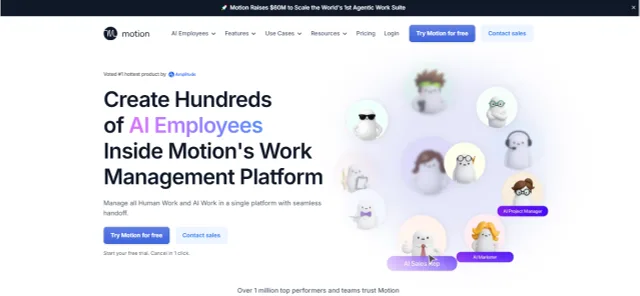
Motion (AI assistant) Key Features
Motion offers a suite of intelligent features designed to replace manual scheduling and time-blocking with AI-powered precision. Distinct functionalities in 2026 include:
- Smart Auto-Scheduler: Automatically reprioritizes tasks based on deadlines, effort, meetings, and personal hours.
- Team Motion Boards: Project boards optimized with calendar visibility and dynamic task allocation by availability.
- Meeting Defender: Protects deep work blocks by suggesting alternative meeting slots based on impact scores.
- Calendar Integration: Bi-directional sync with Google Calendar and Outlook 365—updates in real time with AI adjustments.
- Daily AI Planner: Personalized daily agendas with drag-and-drop overrides and adaptive updates.
Workflow & UX
Motion (AI assistant) excels in UX, particularly in reducing clicks, tab switching, and planning fatigue. The platform feels less like a static tool and more like a living assistant that thinks ahead. Users can interact via:
- Drag-and-drop changes with immediate AI re-optimization
- Keyboard shortcuts for rapid task creation and sequencing
- Split views for My Tasks, Team Dashboard, and Calendar
- Intuitive hover menus with effort/time estimates and schedule impact
Its UI is minimal yet information-rich, borrowing visual cues from productivity tools like Notion and ClickUp, with a sprinkle of Siri-like smart cues along the way.
Motion (AI assistant) Pricing Analysis & Value Metrics
| Plan | Price (monthly, billed annually) | Includes |
|---|---|---|
| Solo | $19 | Auto-scheduling, calendar sync, AI planner |
| Team | $12/user | Shared boards, team calendar, workload balance |
| Enterprise | Custom | SSO, admin controls, onboarding, priority support |
Value Verdict: An ultra-slim solo plan for solopreneurs competes with tools like Sunsama, while the team plan undercuts incumbents like Asana and Monday on AI-focused automation.

Competitive Landscape
Here’s how Motion stacks up against comparable AI productivity platforms.
| Tool | AI Planning | Team Features | Price (Team) | Best For |
|---|---|---|---|---|
| Motion | Advanced | Integrated | $12/user | Teams, Freelancers |
| Sunsama | Moderate | No | $20/user | Solo Professionals |
| ClickUp | Minimal | High | $12–$19/user | Project teams |
Popular Use Cases
- Startup founders scheduling across zones, meetings, and dev sprints
- Remote PMs allocating team tasks by bandwidth and deliverable
- Executive assistants managing executives' time with AI shielding buffers
- Freelancers juggling retainers and client deadlines with progressive time-blocking
Integrations & Ecosystem Alignment
Motion (AI assistant) supports a curated range of SaaS integrations across communications, storage, and spreadsheets:
- Google Calendar / Outlook 365
- Slack: Task notifications and AI meeting wraps
- Zapier: Hundreds of automation triggers from CRMs and PM tools
- Notion + Asana via native sync or Zapier bridges
Pros & Cons
- Pros:
- Real-time AI scheduling is unmatched in speed and reliability
- Minimal learning curve, excellent UI
- Affordable team plans with great value
- Cons:
- Lacks advanced reporting tools for project deep-dives
- Best suited for time/task-centric workflows—less flexible for Kanban power users
- Occasional lag in calendar sync across platforms
Pro Tip: Use Motion’s Daily Planner view each morning to quickly assess priority shifts and lock 3–4 power blocks for deep focus time.
Final Thoughts
Motion (AI assistant) strikes a sharp chord for professionals and teams frustrated by calendar conflict, task ping-pong, and scheduling paralysis. With 2025 placing greater demand on asynchronous clarity and execution-driven planning, Motion delivers. Its unique blend of AI automation, smart calendars, and thoughtful UX gives it a definitive edge in helping time-poor users protect and maximize their week.
However, slow adoption by larger enterprise teams and some missing analytics slices suggest it’s best fit for compact teams, executive users, and high-output freelancers.
Motion (AI assistant) FAQ
Does Motion support multiple calendars?
Yes, it can sync and manage across platforms like Google Calendar, Outlook, and iCal in real time.
Can I use Motion offline?
Motion requires internet access to reschedule tasks and sync with calendars, though cached tasks stay visible temporarily.
Does Motion offer a free trial?
Yes, Motion offers a 7-day free trial of both Solo and Team plans with no credit card required.
What type of support is included?
All users get email support and help docs. Enterprise plans add onboarding specialists and live chat priority queues.
Is Motion suitable for large project teams?
While extremely efficient for small-to-medium teams, Motion’s limited project analytics may under-serve large enterprise portfolios requiring in-depth reporting.