In this article
NinjaOne Overview & 2026 Industry Position
NinjaOne has positioned itself as a user-centric, cloud-native IT management platform built for the evolving needs of modern businesses, particularly managed service providers (MSPs) and internal IT teams. In 2026, NinjaOne is competing directly in a maturing IT operations (ITOps) market that faces pressure to automate, secure, and streamline device and system management across decentralized workplaces. Its centralized dashboard model, which integrates patching, endpoint monitoring, backup, scripting, and remote access, speaks to a growing demand for efficiency through platform consolidation.
With over 10,000 global customers and rapid YoY growth, NinjaOne’s upcoming value lies in speed, automation depth, and ease of integration with existing enterprise stacks. In 2026, the platform's competitive edge centers on rapid deployments, zero-learning-curve interfaces, and adaptability in hybrid IT environments.
From Launch to 2026: NinjaOne’s Journey
Founded in 2013 as NinjaRMM, NinjaOne started as an endpoint-focused remote monitoring and management solution for MSPs. In 2020, the company rebranded to NinjaOne to reflect a broader suite of IT management capabilities. Key milestones include:
- 2016 — Launch of NinjaRMM with RMM + alerting core features
- 2020 — Rebrand to NinjaOne and addition of integrated backup module
- 2021 — NinjaOne scripting engine and native remote tools introduced
- 2023 — Patch Automation 2.0 released plus Linux and macOS support
- 2024 — New Ticketing & Documentation modules; partnerships broaden
- 2025 — Entire platform refactored for workflow automation & unified management
2025 Thesis: Become the command center for lean, scalable IT operations by merging endpoint visibility, automation, and ticketing into a holistic platform.
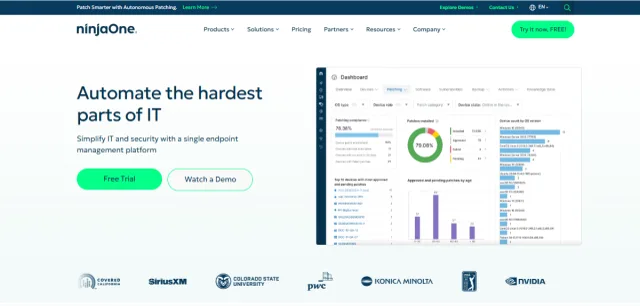
NinjaOne Key Features
NinjaOne's core offering is modular but unified, providing rich IT operations capabilities:
- Endpoint Monitoring & Management: Real-time metrics and remote control for Windows, macOS, Linux devices.
- Automated Patching: Customizable patch policies and compliance reports for OS and 120+ third-party apps.
- Scripting & Automation: Support for PowerShell, Shell, and Python with role-triggered execution.
- Remote Access: One-click, no-install remote control via NinjaOne Viewer (TeamViewer alternative).
- Backup: Cloud and local file/folder and image-based backup with flexible retention.
- Ticketing: Lightweight, IT-friendly ticketing system with rule-triggered workflows.
- Documentation: IT process and infrastructure wiki with access controls.
Workflow & UX
NinjaOne's no-friction UX is part of what sets it apart. Deployment takes minutes, with agents silently installing and auto-grouping by location or OS. Dashboards are customizable by role, revealing only what users need to see. Task automation can be triggered by conditions (e.g., CPU spike), and scripts can be chained without coding. Alerts resolve into tickets auto-assigned by priority.
Real-time search, CLI-like command tools, and context-aware UI elements make working in NinjaOne notably efficient compared to clunkier ITSM platforms.
NinjaOne Pricing Analysis & Value Metrics
| Plan | Monthly Price | Features |
|---|---|---|
| Basic RMM | $3/device | Monitoring, patching, remote access |
| Core Bundle | $6/device | + Scripting, backup, alerting rules |
| IT Ops Suite | $9/device | + Ticketing, documentation, dashboards |
Value Summary: NinjaOne offers exceptional per-device pricing given the breadth of functions. By collapsing multiple tools into one, IT teams can cut license costs by 30–40% compared to stacked solutions.

Competitive Landscape
| Platform | Strengths | Best For |
|---|---|---|
| NinjaOne | Speed, UX, automation, pricing clarity | SMBs, MSPs, remote-first teams |
| N-able | Network tools, security stack | Large MSPs, regulated industries |
| ConnectWise | PSA + RMM all-in-one | Full-service MSPs |
| SuperOps.ai | Modern UI; low cost | Startups, boutique MSPs |
NinjaOne Integrations Ecosystem
NinjaOne integrates with dozens of tools that IT teams already use, including:
- Authentication: Azure AD, Google Workspace, Okta
- Cloud Storage: AWS S3, Wasabi, Google Cloud
- Slack & Teams for alerting
- PSA sync with ConnectWise, HaloPSA, Autotask
- Remote Connect: Splashtop, TeamViewer (optional)
- AV/EDR: Bitdefender, SentinelOne
The open API further allows teams to integrate with asset managers, LOB apps, and financial tools to streamline ticket-to-bill cycles.
Pros & Cons
Pros
- Lightning-fast UI and deployment speed
- Transparent bundle pricing with flexible scaling
- Deep scripting and automation capabilities
- Integrated backup, patching, and ticketing
- Responsive support with excellent documentation
Cons
- No mobile management app currently
- Advanced reporting requires scripting/sync
- Limited native support for on-prem servers
Pro Tip: Use NinjaOne scripting automation + policy groups to reduce Level 1 workload by up to 70% without deploying new tools.
Final Thoughts
NinjaOne is a standout choice for SMBs, mid-sized IT teams, and MSPs looking for robust, modern device and workflow management in a single pane of glass. While enterprise-grade tools like ITIL workflow engines may be more robust, NinjaOne's streamlined interface and task automation allow smaller teams to operate at scale. The 2025 expansion into ticketing and documentation sharpens its all-in-one value narrative.
NinjaOne FAQ
What types of businesses use NinjaOne?
Primarily MSPs and SMBs with internal IT teams. It works best for companies managing 15–5,000 endpoints.
Is NinjaOne HIPAA or SOC 2 compliant?
Yes. NinjaOne is SOC 2 Type II certified and compliant with HIPAA, which is crucial for healthcare and regulated clients.
Can NinjaOne replace my existing backup provider?
Yes, for many use cases. It offers file/folder and full-image backup solutions, with flexible policy controls and restore options.
Does NinjaOne offer a free trial?
Yes, potential customers can get a free 14-day trial by signing up through the website.
What's the best way to onboard into NinjaOne?
NinjaOne provides concierge onboarding help and a quick-start wizard. Many MSPs are fully live in under 48 hours.