In this article
Smartsheet Overview & 2026 Industry Position
Smartsheet is an enterprise-grade work execution platform that blends spreadsheet simplicity with robust process automation, scalable collaboration, and deep integrations. In 2026, Smartsheet is positioned as a leader in Collaborative Work Management (CWM), bridging teams, workflows, and systems into unified project ecosystems. As digital transformation permeates not only tech companies but also healthcare, construction, education, and government, Smartsheet continues to serve as an adaptable orchestration layer that simplifies complexity—especially for structured project and portfolio management use cases.
From Launch to 2026: Smartsheet’s Journey
Launched in 2006, Smartsheet initially positioned itself as a smarter spreadsheet alternative. By 2010, it pivoted toward project management workflows with built-in collaboration. Major milestones include:
- 2014: Surpassed 1 million users, introduced attachments & notifications
- 2017: Integrations with Salesforce, Jira, G Suite mature
- 2019: Acquired 10,000ft to enhance resource management
- 2022: Launched WorkApps, Smartsheet’s low-code no-code suite
- 2023: Released AI-powered Content Collaboration features
- 2025: Rolled out domain-specific intelligent templates tailored to healthcare, construction, and education
2026 Strategy Thesis: Smartsheet’s focus this year is embedding AI automation and predictive analytics into legacy project management workflows without steep learning curves—powerfully simple from day one.
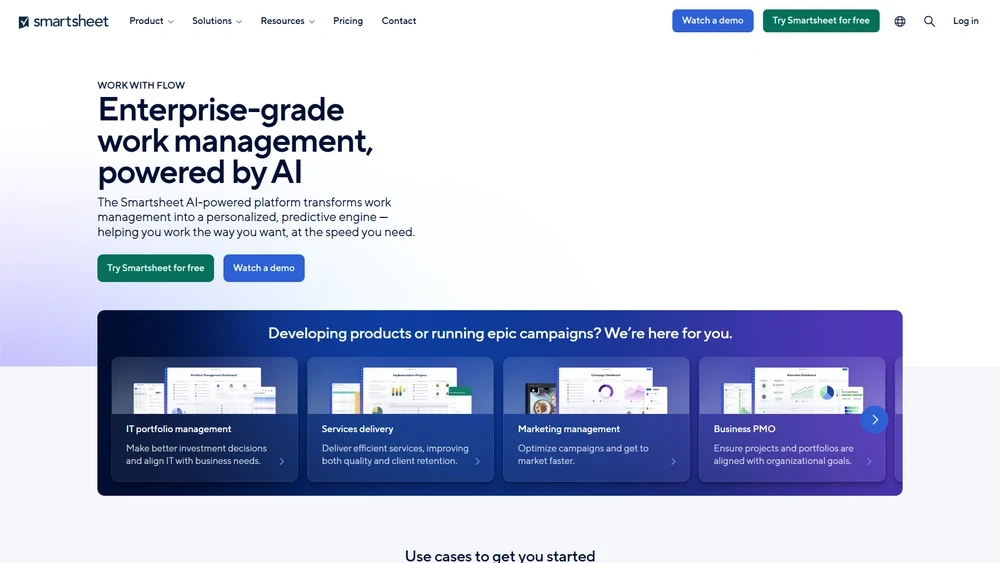
Smartsheet Key Features
The platform provides a wide suite of tools that balance enterprise requirements and user-friendliness:
- Grid View: Familiar Excel-like interface that supports real-time edits, comments, and attachments
- Card View: Ideal for agile workflows and project sprints, including drag-and-drop logic
- WorkApps: Custom no-code portals that bundle relevant dashboards, forms, and sheets into tailored UIs
- AI Automation: AI-enabled predictions, content generation (emails, tasks), and smart summaries
- Project & Portfolio Management: Dedicated templates and rollups with executive visibility
- Document Builder: Automates population of PDFs from row-based data
- Resource Management: Allocation controls, workload heatmaps, forecasting
Workflow & UX
Smartsheet's user experience strikes a delicate balance between familiarity and sophistication. The grid layout feels intuitive for spreadsheet-native professionals, while dashboards, Gantt charts, and card views accommodate diverse user personas. Navigation is seamless with persistent toolbars and contextual menus. Notably, onboarding wizards and in-product tutorials help smaller teams get started with minimal friction. Document generation, file sharing, and comment threads are built directly into rows and sheets, transforming what might feel like Excel into an intelligent collaboration layer.
Pro Tip: Use column-level automation and conditional formatting to highlight risks or overdue dependencies across portfolio projects in real-time dashboards.
Smartsheet Pricing Analysis & Value Metrics
| Plan | Monthly Cost (billed annually) | Best For | Core Inclusions |
|---|---|---|---|
| Free | $0 | Personal tasks | 1 user, 2 sheets, 500MB storage |
| Pro | $7/user | Small teams | Up to 10 editors, forms, dashboards, email support |
| Business | $25/user | Departments | Unlimited editors, workflows, document builder, SSO |
| Enterprise | Custom | Full org rollouts | Advanced IT controls, integrations, premium support |
Value Assessment: Smartsheet pricing scales well across growing teams, balancing access to automations, dashboards, and collaboration tools. The Business tier offers the richest feature-to-cost ratio for most mid-sized organizations.

Competitive Landscape
| Tool | Best For | Key Differentiator |
|---|---|---|
| Smartsheet | PMP teams, IT PMOs | Structured grid + WorkApps + automation |
| Monday.com | Marketing & agile teams | Visual UI, colorful layouts |
| Asana | SMB teams | Task-centric timelines, easy UX |
| ClickUp | Startups & freelancers | All-in-one at budget pricing |
| Wrike | Enterprise IT & Ops | Advanced workflows |
Smartsheet Use Cases
Smartsheet shines across regulated, multi-stakeholder environments where execution rigor meets collaborative needs:
- Healthcare: Patient intake, credentialing, HIPAA-compliant workflows
- Construction: Site schedules, contractor tracking, permit visualization
- Education: Curriculum planning, grant submission workflows
- Marketing Ops: Campaign calendars, design approvals, asset tracking
- Finance: Budget approvals, fiscal allocations, audit trails
Smartsheet Integrations
The ecosystem plays well with tools across collaboration, IT, CRM, and data infrastructure:
- CRM: Salesforce, Microsoft Dynamics
- Collaboration: Google Workspace, Slack, Microsoft Teams
- Storage: OneDrive, Dropbox, Box
- BI Platforms: Tableau, Power BI via ODBC
- Dev Tools: Jira, GitHub (via Bridge connectors)
Premium connectors and Smartsheet’s Data Shuttle expand the ability to sync large datasets without manual duplication.
Pros & Cons
- Pros:
- Dynamic views: grid, card, Gantt
- AI-enhanced automation & summaries
- WorkApps for tailored user experiences
- Enterprise-level governance & controls
- Cons:
- Learning curve for advanced automations
- Enterprise pricing can add up quickly
- Mobile app less robust than desktop
Final Thoughts
Smartsheet fits organizations seeking structured execution and scalable collaboration, especially in regulated or cross-functional environments. Its blend of grid simplicity, WorkApp customization, and AI automation unlocks visibility and accountability at every level. For startups, tools like ClickUp may feel lighter, but for teams needing high orchestration with flexibility, Smartsheet makes complexity actionable.
Smartsheet FAQ
What is Smartsheet primarily used for?
Smartsheet is used for project management, work collaboration, and business process automation across industries like construction, healthcare, and education.
Is Smartsheet better than Excel for project tracking?
Yes. Smartsheet offers project views, automation, and collaboration Excel lacks. It's purpose-built for evolving workflows and team access.
Does Smartsheet integrate with Jira?
Yes, Smartsheet integrates with Jira through its bridge connector and enables bidirectional syncing of tasks, comments, and timelines.
Is onboarding easy for non-technical users?
Yes. Smartsheet offers templates, in-app onboarding guides, and learning center resources tailored for new and non-technical team members.
Can I switch from Microsoft Project or Excel?
Absolutely. Smartsheet supports data importing from Excel/MS Project and has tools to replicate structures for easier migration.