In this article
GanttPRO Overview & 2026 Industry Position
GanttPRO is a project management tool built around the visual power of Gantt charts, offering intuitive planning, real-time collaboration, and task automation for teams of all sizes. As of 2026, GanttPRO stands as one of the top tools for visual project planning and team alignment in industries ranging from software development to construction. With a refined user interface, enterprise-level integrations, and enhanced AI features, GanttPRO provides a lightweight yet powerful alternative to heavyweight platforms like Microsoft Project or Monday.com.
Founded with the goal of making Gantt charts accessible to all team members—not just project managers—GanttPRO has pivoted from a niche tool to a full-spectrum resource for modern organizations in need of easy task dependencies, resource management, and granular timeline views.
From Launch to 2026: GanttPRO’s Journey
Launched in 2015, GanttPRO began as a simple online Gantt chart tool for small teams. Over the years, it introduced key milestones like:
- 2017: Team collaboration and sharing capabilities debuted.
- 2019: Resource and cost management features added to serve enterprise users.
- 2021: Custom workload views and task prioritization launched.
- 2023: API and Zapier integrations expanded.
- 2024: Mobile-optimized dashboards and AI task suggestions rolled out.
Heading into 2026, GanttPRO’s strategic direction centers on interoperability, securely connecting workflows across ecosystems with native integrations and flexible role-based permissions.
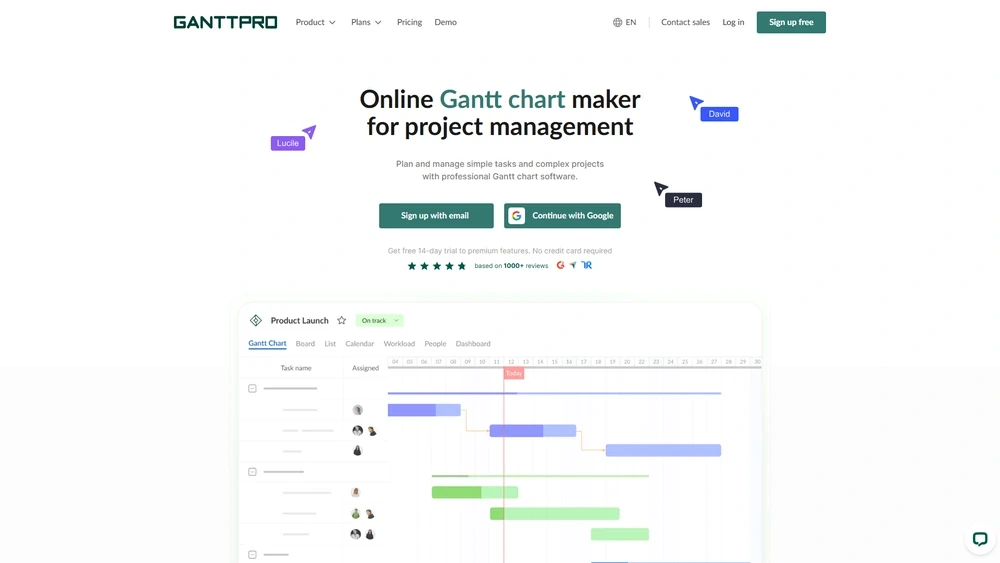
GanttPRO Key Features
GanttPRO packs a surprising punch in terms of usability and functionality. Key features include:
- Gantt Chart-based planning: Drag-and-drop interface with dependencies and baselines.
- Task & Subtask management: Prioritize with custom statuses and progress tracking.
- Resource Allocation: Assign workloads, manage availability per user or role.
- Time Logs: In-built time tracking to support billing and task estimates.
- Collaboration tools: Comments, attachments, and real-time sync across teams.
- Templates library: Dozens of prebuilt workflow maps for marketing, IT, and logistics.
Workflow & UX
GanttPRO’s layout is efficient, well-indexed, and responsive across devices. The homepage dashboard gives access to all active projects. Inside a project, key UX wins include:
- Sidebar navigation: Gantt, Board, List, and Workload view toggles
- Task bar context menus: Modify progress, dependencies, or deadline directly
- Auto-saving with version history: Change tracking for rollback
- Dark mode support: Available in beta across web and desktop apps
Pro Tip: Use the Workload feature with color-coded load indicators to prevent over-assigning tasks to your team members.
GanttPRO Pricing Analysis & Value Metrics
As of July 2026, GanttPRO offers four pricing tiers, with a new Enterprise SSO option included in its Business plan. Here's how it breaks down:
| Plan | Monthly (billed annually) | Features |
|---|---|---|
| Basic | $9.99/user | Gantt + List view, dependencies, basic support |
| Pro | $15.99/user | Time tracking, integrations, templates, history |
| Business | $23.99/user | Workload, roles, SSO, priority support |
| Enterprise | Custom | Custom SLA, onboarding, SAML, API limits |
Value-wise, the Pro plan offers an optimal balance of flexibility and collaboration tools for mid-sized teams, while Business is suited to compliance-focused companies.

Competitive Landscape
In 2026, GanttPRO competes with niche and generalist tools—but holds its unique place. Here’s how it stacks up:
| Tool | Best For | Key Differentiator |
|---|---|---|
| ClickUp | All-in-one operations | Deeper automation and documents |
| Smartsheet | Enterprise compliance | ISO/SOC2, GovCloud options |
| TeamGantt | Small teams | Simpler UI, limited depth |
| GanttPRO Teams | Visual planning-driven workflows | Gantt-first design, affordable mid-tier |
Use Cases
GanttPRO shines in industries where timelines and dependencies drive outcomes. Common use cases include:
- Marketing agencies: Campaign planning and cross-functional asset creation
- Product teams: Roadmapping, sprints, and release schedules
- Construction firms: Task dependencies, budgets, contractors
- Event planning: Vendor management, deliverables, deadlines
GanttPRO Integrations
GanttPRO supports a growing list of third-party integrations out-of-the-box and via API or Zapier:
- Slack
- Google Drive / Dropbox
- Jira / Trello
- Microsoft Teams, Outlook
- TimeCamp, Toggl Track
Pros & Cons
- ✔ Pros: Clean UX, Gantt-first approach, short learning curve, flexible user roles.
- ✘ Cons: Limited offline support, no native kanban for Pro plan, mobile tablet app still in beta.
Final Thoughts
Whether you're a project manager at a startup or leading a cross-departmental team in a mid-market firm, GanttPRO offers visual clarity with enterprise depth. Teams that thrive on transparency, resource awareness, and date-driven workflows will find it an ideal fit—though teams seeking deep automation dependencies may seek broader alternatives.
GanttPRO FAQ
Is GanttPRO good for agile teams?
Yes, GanttPRO supports agile workflows with custom statuses and task hierarchies, though it’s more suited to hybrid Agile-Waterfall planning models.
Can I use GanttPRO offline?
Offline mode is limited as of 2026. An offline-friendly desktop app is in beta, but core functionality remains web-based.
Does GanttPRO support SSO and role-based permissions?
Yes. The Business and Enterprise plans offer SSO, SCIM provisioning, and detailed permission controls for teams and departments.
Is there a mobile version of GanttPRO?
Yes, mobile-optimized web access is available, and native mobile apps are expected to exit beta by Q4 2025.
What support options does GanttPRO offer?
Support includes live chat, email, and help docs for paid accounts. Business/Enterprise plans get dedicated onboarding and faster response times.